Here I will post small tutorials for how I make graphics different things.

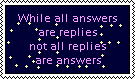
I recently downloaded LibreSprite to make animated pixel art. I made that button yesterday (June 30 2026).
I started with making the not animated parts. I colored the whole button dark purple and drew the frame and text on it. Plenty of art programs will let you type text, but for pixel art I prefer drawing the letters. I call that font "Noah S attempts pixel art".
Then I added more frames. That button has 31 frames, which is a completely random number with no significance. LibreSprite assumes that you want to make changes from the previous frame and copies it to the new frame, so I ended up with 31 identical frames of the button with no twinkling. I picked 2 colors for my twinkling stars, light blue and light blue that's almost white.
After that I went to a random frame and drew a one pixel spot in one of the colors in a random place that wasn't right next to the text. Then I colored the same pixel with the same color for the next 4 frames too, so that it lit up for 5 frames. After that I went back to the middle frame of the ones I had colored and also colored the pixels directly above, below, to the left and to the right of my spot, so that it looked like a +.
I repeated this process, starting at random frames and switching between the 2 colors I had picked for the twinkling. After I had made a few of those animations, I started making single pixel spots on random frames without doing anything on the frames next to that spot. That way there's variation in how long the twinkles last.

I'm adding this on July 15 2026, just after finishing making a third template available by working around the restrictions of the technology. Here's how I did it.
I use joomla (a CMS) to build my website, and astroid frameworks (a joomla addon) for template management.
They have the modern restriction of the only user customization being a light/dark switch. I was not happy with this. They'd let me make more templates, but I could only assign them to predetermined pages.
I successfully made a custom module that let the user pick between an unlimited amount of templates, but the selection reset upon going to another page. This is the code for the template picker.
You can see it in action here. It's an oldschool expanding options form with a submit button. As you can see, it has 3 options. Pink and pale blue (light); Purple and green (dark); Orange and pale green (light, animation). The values attached to the options are their names on the backend, the options are the text that the form displays when you use it to pick a template.
I spent a few days stuck at this stage, attempting to get joomla to accept a cookie with the chosen template and then display it. I couldn't do that. So I started thinking outside of the box.
The astroid frameworks backend editor lets me make individual changes to each template without affecting the rest of them. This includes which items will be displayed to visitor. Items like menus on the left of my content.
And yesterday when I made my custom error 404 page, I had only inserted the code for it in my default template. My default template is one with a light/dark switch that's not displayed among the options in the code above. Unless told otherwise, that's the one that joomla will show you. After I made the error 404 page, I went to put a link to it in the "just for fun" menu. And I saw that it was asking which template to use when visitors click on the link.
This morning I put those 2 things together for an experiment. I opened the template called astroid_template_two_pink_blue (a template that's the only light version of the default one; astroid_template_two_purple_green is the only dark version of default) and went on to remove the menu and replace it with a template exclusive. On the backend that menu is called "Main menu pink blue", but it shows only "Main menu" to visitors.
When I opened a page in the pink and pale blue template, there was no menu. But joomla lets you link to the same content (that stuff in the middle column on my website; code for it is stored separately from everything you see around it and can be called for insertion) with as many menu items as you want. So I took that template exclusive menu and filled it up with links to the same content, except in the field where it asked which template to load, I selected astroid_template_two_pink_blue. Then I repeated the process for the just for fun menu, and did the same thing for the purple and green template.
I had now successfully made joomla keep the user selected template for menu navigation.
And I wasn't done yet. The whole point had been to give more than 2 options. So I made an orange and pale green template in astroid and repeated the process with the menus. And then I added a somewhat modified cursor trail script to that one where I had changed some numbers and accidentally added a delayed confetti trail. I have no idea how, but it's there and I like it. I did this because I can now do animations as an opt in feature.
During the past week, I also asked for help on the joomla forum and was given less than helpful advice like "make a plugin" and instructions on how to make a light/dark switch. Which I already had and my first sentence was that I want more than 2 options.
But thinking outside of the box worked.
This is written the next day, after I've been fixing links in the middle column to keep the template. Here's the code from the gallery page linking to the extended gallery.
window.location.href checks the current url that the visitor is on. My if else if goes through the possible options for links from the template exclusive menus and assigns different values to the text variable if you're on a page with a chosen template. If you're not on a template specific page, the text variable is a link to the extended gallery with the default template.
document.getElementById("extendedgallerylink").innerHTML = text; inserts the text variable where there's an html element with the id "extendedgallerylink", in this case at the end of the text at the start of the code. The <span> html tag is for putting something into an already existing paragraph. "let text;" is there because Javascript needs you to declare variables outside of any {}, otherwise they only exist inside of the {}.